显示标签为“GM Tech2 Scan Tool”的博文。显示所有博文

2018年8月21日星期二

Genuine Tech2 PCMCIA card vs. generic ATA card

Some guys want to BIN files onto blank cards.Here, i will share to enlighten you to what the differences are between a genuine Tech2 PCMCIA and a generic ATA card.
genuine Tech2 PCMCIA card vs. generic ATA card:
There are two primary types of flash memory architectures: linear and ATA. Both conform to PCMCIA form factors and can be used interchangeably in existing PC Card slots or drivers.
Linear Flash memory stores and sends data in a linear fashion (in Byte or double Byte format). To be able to transfer data into blocks (like ATA technology), so that the card appears like a hard drive, Linear Flash requires a software layer called Flash File System.
ATA Flash mimics the file structure of an ATA hard drive. It features an on-card controller which handles error correction coding, bad-block mapping, dynamic adjustment of performance versus power consumption, extensive self-testing and diagnostics and data access functions. This means that a card with an ATA controller appears like a hard drive to virtually any mainstream personal computer operating system.
In short, the most important difference is:
ATA cards won’t work. An ATA card is like a giant sd card or USB drive.
The linear flash cards don’t get recognized by the CPU like that.
For me:
– The restoring card:
You can buy generic linear flash cards on eBay for like $70
This is what I did for a spare. Same place I ordered my unit from. Cheaper than eBay.
I used the card making software mce in a laptop, but you can order it from China with the software you want already loaded.
So far,  I am happy with it, the card took a few weeks. The unit was 2 to 3 days and a guy recommended them on the duramax forum. I have a duramax and the Pontiac g8. I am happy. Works great, I would recommend again.
– Tech2 scan tool
For the Tech 2, there are 3 different units, look the same.
That is what I found on the site.
SP23-B Best
SP23-C Vetronix
SP23-D Newest
I did the SP23-B. From what I was able translate they are made by different companies but the same….
I went with the best as it was a little cheaper. I am happy with what I got. If I did it again and money wasn’t an issue, I would buy one with the American warranty.
Related Post:

2018年8月7日星期二

GM Tech2 Service Programming what is required?

To perform service programming with GM Tech2 scan tool, you need following:

1. Tech 2 scanner
2. 5 CDs (2 default CDs in package and 3 TIS2000 software CDs)

Tech2 User Manual CD
GM tech2 default TIS2000 CD, no USB key, cannot program SPS

3. USB key security dongle

4. A RS232-DB9 adapter
5. Laptop/computer with COM Port
6. Connect RS232-DB9 adapter with Tech II


GM Tech2 scanner package without TIS2000 and USB key, cannot do service programming:

GM Tech2 pass-through or go-between Process to Program A Module

Here is the How-to guide on progamming a module:

In details:
1.The pass-through is to use with a laptop in the vehicle and it just uses the Tech 2 as the connection between. This is the fastest and easiest way to do it.
That is, the data are directly downloaded from the PC to the ECU in the vehicle.
Although the GM Tech 2 is still necessary in the mode, the data entry and the download control is done directly at the pc. Altogether, the method is faster, and it is recommended when a pc with TIS2000 software is within 3m of a vehicle.
 
  1. Connect Tech 2 to the vehicle.
  2. Connect Tech 2 to the PC switch on Tech 2.
  3. Start TIS 2000 on the PC.
  4. Select the icon ‘Service Programming System’ (Fig. 1) on the TIS2000 start page.
  5. Start TIS 2000 on the PC.
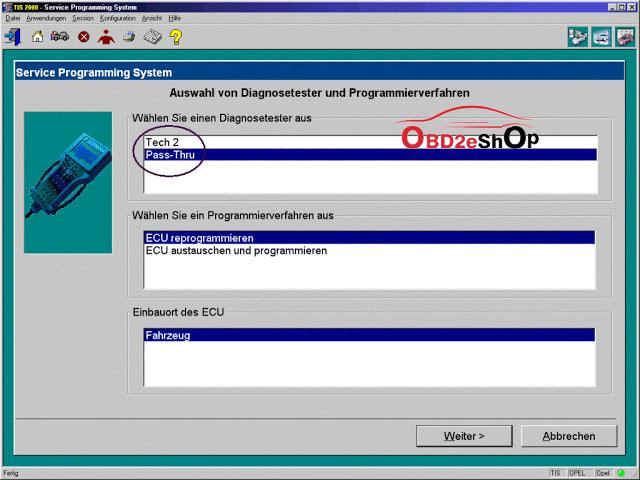
  6. On the screen ‘Select Diagnostic Tool and Programming Process’ (See picture below) make a selection for
 
***Pass-Thru mode
***the reprogramming of an ECU that was not exchanged or the replacement/programming of a new ECU
 
***the ECU location.
Then clock ‘Next’ button.
Tech2-program-ecu-pass-thru-1024x768
 
2.The go-between method is for when you can’t bring the computer into the vehicle and uses the gm Tech2 scanner as a go-between. You connect the Tech 2 to the vehicle and download the module information that you want to program. Then you disconnect, run to the computer running Tis2000, connect it to the computer and download the programming information for that module, disconnect again and run back to the vehicle, connect it and it automatically programs the module. It can take a long time depending on the module (PCM is the longest).
 
Have fun in GM Tech II programming!
Good luck!