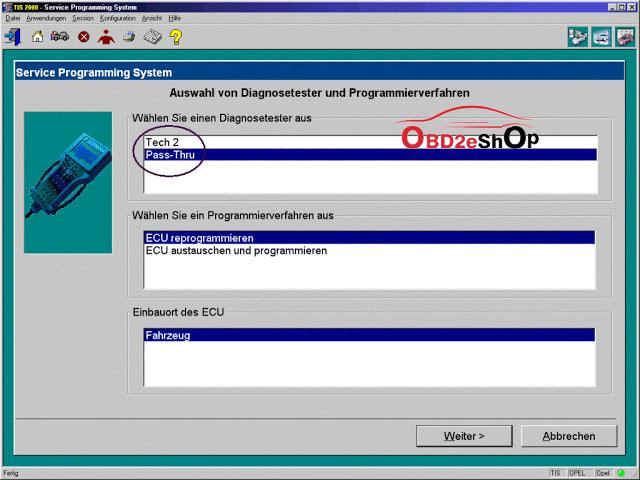
1.The pass-through is to use with a laptop in the vehicle and it just uses the Tech 2 as the connection between. This is the fastest and easiest way to do it. That is, the data are directly downloaded from the PC to the ECU in the vehicle.
Although the GM Tech 2 is still necessary in the mode, the data entry and the download control is done directly at the pc. Altogether, the method is faster, and it is recommended when a pc with TIS2000 software is within 3m of a vehicle.
Connect Tech 2 to the vehicle.
Connect Tech 2 to the PC switch on Tech 2.
Start TIS 2000 on the PC.
Select the icon ‘Service Programming System’ (Fig. 1) on the TIS2000 start page.
Start TIS 2000 on the PC.
On the screen ‘Select Diagnostic Tool and Programming Process’ (See picture below) make a selection for
***Pass-Thru mode
***the reprogramming of an ECU that was not exchanged or the replacement/programming of a new ECU
***the ECU location.
Then clock ‘Next’ button.
2.The go-between method is for when you can’t bring the computer into the vehicle and uses the gm Tech2 scanner as a go-between. You connect the Tech 2 to the vehicle and download the module information that you want to program. Then you disconnect, run to the computer running Tis2000, connect it to the computer and download the programming information for that module, disconnect again and run back to the vehicle, connect it and it automatically programs the module. It can take a long time depending on the module (PCM is the longest).
Here is the review on 2006 c6 with GM TECH II scanner
I just checked my Tech II clone against my 2006 C6. In the ABS section there is an "Automated Bleed" option. In the Radio section there is a "VIN Relearn" option. I've never actually used either one, but I bet they work.
The clones are literally running the same software as the Tech II, so they have all the same functions. There are a few caveats: the standard clone power supply will cause the unit to reset if you run the starter motor, apparently, though this can be fixed. Also, operating while tethered to a PC involves a bunch of licensing hacks and other nonsense. But you only need to do that if you want to flash the ECU firmware.
The Tech II lets you see (and individually reset) all the DTCs from all the modules. It also has a bunch of special functions and bidirectional capabilities.
It's great as a standalone diagnostics tool but it isn't intended to modify ECU parameters like tuning software does. This is a tool for fixing the car, not modifying it.
A lost of GM Tech 2 alternative from many forums,here the collection voice on www.corvetteforum.com.
1.@Dano523:
On the c6 Corvette, short of needing to download a firmware file to flash it into a new replacement module like a BCM that if vin dependent, all you need to troubleshoot and reset items on the car like a radio relearn is the Tech 2win program that is going to come on the disc. With this program and the GM nano, you don't need a subscription from GM. Hence think of a TV, where it first need to be a operating system programming to be with (the firmware file), then once it flashed, all you need from that point is the remote control (tech2win in this case)
If you did need to replace one of the module like the BCM, ECM, Dash gauge cluster that requires a Vin specific firmware file, then the software you would need is TIS2000. Hence in Tis2000 program, is the Service Programming System program that would first require a subscription to GM to allow you to connect to GM servers to pull down the specific firmware file for your cars vin number, then flash it into the module for it initial set up.
Hence once you have the module replaced and it's needed firmware for the vin flash in to the module to begin with, then resetting the modules settings is done with the Tech2 win program instead. Hence the only time you would need Tis2000, if if you are replacing a bad module on the car that requires firmware to be programmed into the module to begin with, and which that firmware file would come from GM for its initial flash.
TIS2000, And note that you will be using the stand alone Tech2 win with the nano, and not the tech2 view from TIS2000.
Now lets go over the C7 and later model cars that do not use a Tech II, but use a MDI instead (the GM Nano is mdi clone).
So GDS2 works the pretty much the same at Tech2 win for the most part/what it will do, so again, short of needing to flash in firmware to a brand new replacement module, GDS2 covers most of the items on the car for trouble shooting and resetting as well.
Now if you do need to replace a module on the car needs to be initial firmware flashed to the vin to start with, here is where you would need the Service Programming System program again.
Now with GDS2, it not Tis2000's programs SDS that you need, but GM GlobalTS program that will have the correct SDS for the newer cars that use GDS2 instead. Like the either of the SDS, to be able to connect to GM to get the needed firmware files from their servers, you would need to have a subscription to GM to run GM GM global software.
Now the part that blows on the C7, when you want to program in a Fob to the car using the tool, it not done with the GDS2 program. Hence in a c6, Tech2win allows you to program a fob into the car quickly since the needed menu in within the Tech2win program.
To program a fob into a C7 with the MDI, you have to use the GM global SDS program, since that is where the VTD relearn menu is located to program in fobs instead. Now the glitch, do not think that anyone has cracked GM TS to have it run stand alone/ hence without needing a subscription to GM to run the program/without it needed to connect to GM, since it it a web base program.
GM TS, or more so, the web link since it a web base program.
2.@Have GM corvette, recently ran into an issue where I wanted to replace my aftermarket pioneer (didn't like it and much prefer my smart phone) with a stock unit. Found a cheap OEM unit on eBay. After install, i realized that factory head units are tied to the original cars VIN. No problem, I'll pay the dealership to fix the issue. Only problem they outright say they CANNOT guarantee they can fix the locked status of my radio and i'd still have to pay. As an IT/Network technician, i couldn't imagine telling people i can't guarantee I can fix your network or pc problems, but you still owe me full price plus tax.
Enter the VXDIAG VCX Nano for GM scanner. I was looking into clone tech II's for the past couple weeks and stumbled onto this gem. There is very little info on this product, but i still had more faith in this thing and myself more than my own dealership so i took the plunge. For $119, I basically have the software version of a tech II device. I was able to unlock my radio in a matter of minutes. Have never used a real or upscale scan tool device so i can't compare but just poking through some of the menus, it looks like i can do anything a tech II can. Cool thing is that the tech2win software runs just fine on my Windows 10 64bit laptop. Would be even cooler with a surface pro or similar tablet. I'm sure there are reasons for owning an actual tech II device over just software, but I wanted to try something different out of curiosity and explore other options for those that want an even cheaper alternative. Credits to @bgspot (corvetteforum.com forum member).
The way to make the connection between the VCX Nano and the computer:
You plug the device into the OBD2 port, and then you either use Wifi back to the laptop to connect that way ($119), or you can use a usb cable instead ($109).
You have options: USB version & Wifi version
VXDIAG GM GDS2 Install Video Works on WIN 7 8 10 32bit/64bit, GDS2 is verified running in the VM software.
Customer issue: I have a tech II with Saab v148.o card in it. I have tried from Globaltis(Cracked) and TIS 2000 (Hardware key) but cannot gain security access. Tis2000 gives me the error “cannot connect with security server” Globaltis just says “error” when trying to gain security access. I know it is communicating with the tech ii, because during the security check the tech goes from the home screen to “downloading”. I am using a laptop with a TRENDnet TU-S9 USB to Serial Converter running XP SP3. I have java version 6 update 12 running.
The only think I’ve noticed is the when starting globaltis it states “SAAB Automobile AB v146.00”. I have the 148 SAAB PCIAM card, do not know if that could be affecting it or not.
Customer solution from mhhauto forum:
Very important. Here in the forum two types of SAAB v148.000 PCMCIA was shared One for Tech2 hand held and one cracked for Tech2 Win In Tech2 hand he'll only the one for its working If its the right card uploaded in your tool card then go Security and do it Try Java v 6.26 Its the best for GlobalTis or Java v7.0 Do you have it or not installed the SAAB v148.000 PCMCIA installed and can you connect to your SAAB car? If not you can find this PCMCIA SAAB v148.000 for Tech2 hand held in the forum ( Not the one for Tech2win ) and use Card writer to flash you PCMCIA or MCE software Or use the advise of Mr. techamp (try to re-flash your Tech 2 PCIMA card with Globaltis so your hardware and software match. i believe version on globaltis is 146.00.) and use the SAAB GlobalTis to write your PCMCIA card Then go to your card and check if the diagnostic is possible Then connect again the Tech2 with the computer ->power it up ->run the GlobalTis-> use Security Then you can do any SPS Programming in your car Good luck loading.. (Credit to mattydr67) http://blog.obd2eshop.com